PHP2Shell · PHP version check
PHP2Shell checker: how to check your website's PHP version
Not sure whether your WordPress site, online store, or PHP application needs an urgent update? Start by checking the PHP version actually serving your website. A plugin update or a new PHP version in your terminal does not necessarily mean the website is running a fixed version.
Check your website with PHP Check →
Our free PHP2Shell checker reads the PHP version a website exposes publicly and compares it with the official fixes. It does not require an account, install anything on your server, or run exploit code. If the website hides its version, the result says unable to determine, rather than giving you a false green light.
How to check your website for PHP2Shell version risk
- Open PHP Check and enter a website you own or are authorized to check. A domain such as
example.comis enough; you can also enter its complete HTTP or HTTPS address. - Select Check website. The tool looks for a PHP version in public response headers, following up to three public redirects. It does not search your files or attempt to log in.
- Read the result and open View evidence and response information to see the reported version, response information, and official source. Use the running PHP version on your server to confirm any update decision.
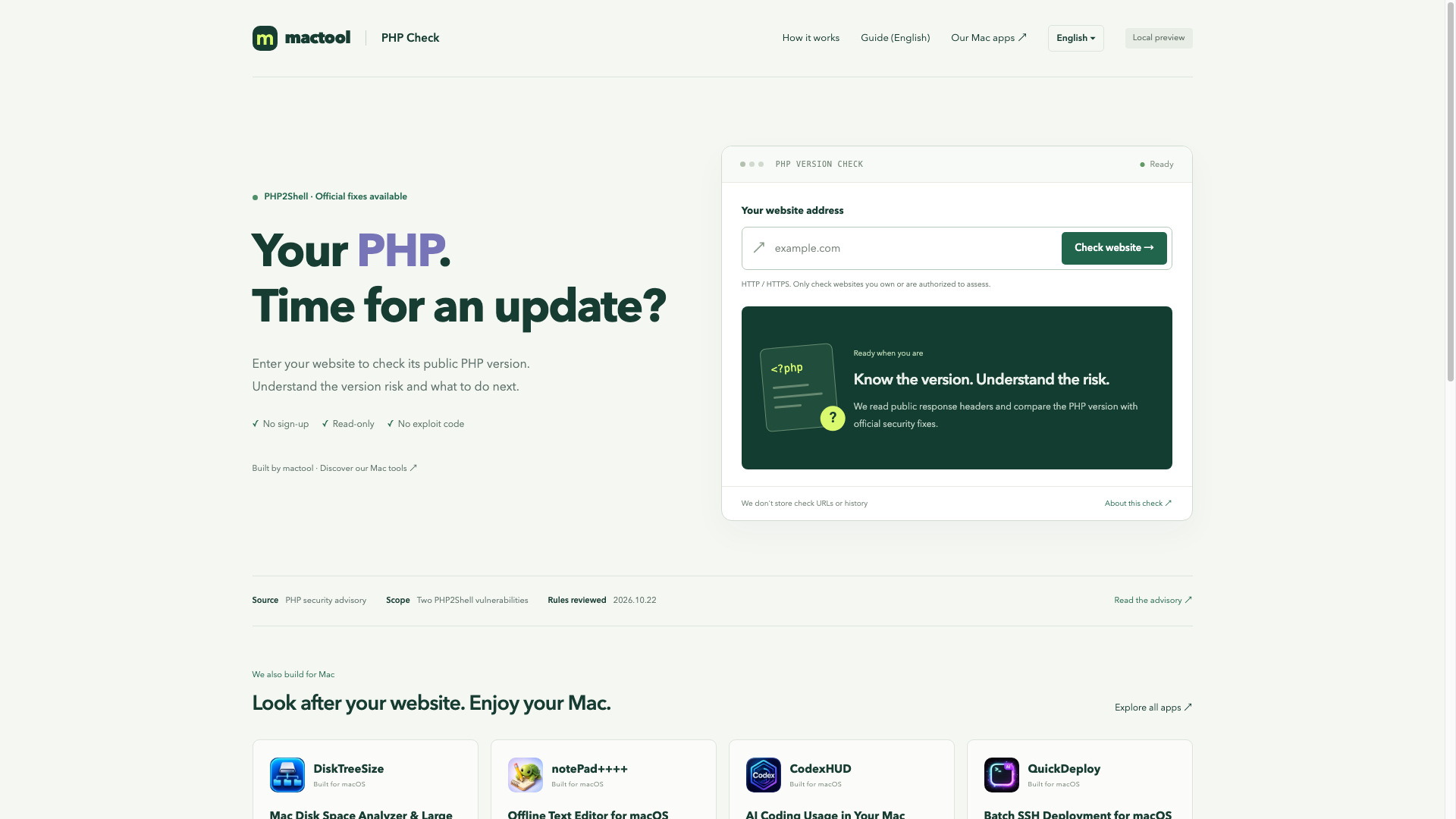
The actual PHP Check interface, before a check. The illustration does not show a result for any website.
Which PHP versions contain the official fixes?
PHP2Shell refers to CVE-2026-109618 and CVE-2026-109619. PHP's security team published the following fixed releases on 21 October 2026:
| PHP branch | Official fixed release |
|---|---|
| PHP 8.2 | 8.2.35 |
| PHP 8.3 | 8.3.36 |
| PHP 8.4 | 8.4.27 |
| PHP 8.5 | 8.5.12 |
For example, a reported PHP 8.3.35 is older than its branch's fixed release, 8.3.36. A stable version at or above that release meets this particular version check. That is not a claim that the whole website is secure.
The version table comes from the PHP project's official security announcement and the advisories for CVE-2026-109618 and CVE-2026-109619. Use those sources and your package vendor's current guidance when planning an update.
What do the three checker results mean?
Version risk detected: the reported version is older than the official fixed release for that branch, or belongs to an old branch no longer maintained by PHP. Review the installed package and ask your host or administrator to apply the appropriate security update. A vendor may have added fixes to an older version without changing its upstream number.
Meets the official fixed version: the reported stable version reaches the relevant PHP2Shell fix. This result covers these two vulnerabilities only. It does not inspect your plugins, passwords, application code, or server configuration.
Unable to determine: the response does not reveal a usable PHP version, or the version has a vendor or prerelease suffix that needs further confirmation. The site might also use a different technology. There is no reliable way to turn a hidden version into an all-clear result.
How to check PHP when the website hides its version
Check the PHP settings for that specific domain in your hosting panel, or ask your hosting provider which PHP package is handling web requests and whether the two PHP2Shell fixes are installed.
If you administer the server, php -v shows the command-line PHP version. A site using PHP-FPM—the service handling PHP requests for many websites—an Apache module, or a container may run another version. Confirm the website's own environment instead of relying only on the terminal output. You do not need to publish a phpinfo() page to use this tool.
Once you know the complete version, open Know your PHP version? Compare it directly on PHP Check, enter it, and select Compare version. The result is explicitly marked as a manual comparison; it has not verified the installation on your server.
What to do if your PHP version needs an update
Check compatibility with your application, make a usable backup, and follow your hosting provider's or package vendor's update procedure. After applying the update, restart the relevant PHP service or workers as required by that procedure, then verify the version serving the website and check that the site works normally.
PHP 8.1 and older no longer receive regular official maintenance. Some vendors provide their own security fixes for old packages. If you depend on one, ask the vendor specifically about both CVE identifiers; otherwise plan a move to a supported PHP branch. Hiding the version header is not a substitute for applying the fix.
Does this PHP vulnerability checker attack my website?
No. It sends an ordinary HEAD request, falling back to GET only when HEAD is unsupported, and reads response headers. There are no uploads, login attempts, or exploit payloads. The tool does not store checked URLs or a check history. Only the domain is sent to Cloudflare's public DNS service to find the public server address; do not enter URLs containing private tokens.
Maintain your website on a Mac?
PHP Check is a free tool from mactool, an independent maker of Mac apps. For everyday website work, notePad++++ provides local text editing, regular-expression find and replace, and column editing. If old projects and downloads are filling your Mac, DiskTreeSize helps you see which folders take up the space.
Ready to start? Check your website's PHP version →